Management you can check
Everything we do for you is visible: status, reports, approvals and requests. Not a black box, but one overview that is always up to date.
Included with local SEO, outsourced SEO, Microsoft 365 management and the Web Platform
Try it yourself
Nothing is saved or sent.
- Status of your services
- Reports
- Approve with one click
- Track requests
- Documents and agreements
- Invoices and contracts
Six things you never have to ask about again
Current status of all your services
Website online? Certificate valid? Backup successful? Devices compliant? One dashboard with the status of everything we manage for you.
- WebsiteOnline
- CertificateValid
- BackupMade last night
- DevicesUp to date
Reports in one place
If reporting is part of your service, you will find every report here: what was done and what it delivered. Including the reports from months ago.
Approvals with one click
New design, campaign budget, go-live: decision points are ready for you in the portal. You approve or ask a question, with a record of who approved what and when.
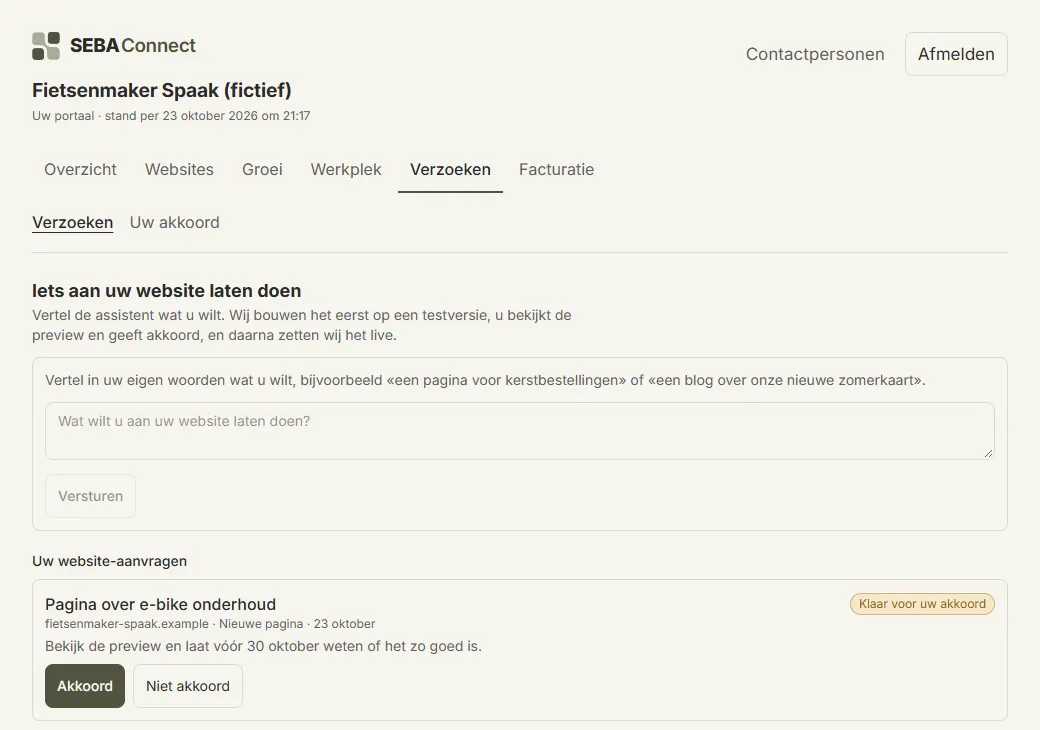
Submit and track requests
A change to your website or a question about your workplace? Submit it through the portal and follow its status. No lost emails.
- Change opening hoursIn progress
- New team photo on the homepageCompleted
- Add a colleague to Microsoft 365New
Documents and agreements
Quotes, contracts and handover documents neatly together, including what was agreed about scope and ownership.
- QuotePDF
- Ownership agreementsPDF
- Website handover documentPDF
Invoices and contract information
What is running, what does it cost and until when? Your invoices and contract information are always visible. No surprises at the end of the month.
Transparency is not an extra, it is the service
If you buy several digital services, you soon lose your grip without an overview: what is running, what does it cost, who approved what? The client portal is our answer. It runs on the same platform we use to deliver our services, so what you see is where we work. One reality, for both of us.
You see for yourself what is happening
With us you do not have to call to ask how things are going. You log in and see it.
- Your website Whether it works, how fast it is and when the last backup was made.
- Your growth How many enquiries came in and how you are found.
- Your workplace Which devices are secured and whether everything is up to date.
Questions about the client portal
What is the SEBA Connect client portal?
A secure online environment where you see everything SEBA Connect does for you: the status of your website and workplace, reports, pending approvals, requests, documents and invoices. One place instead of scattered emails and spreadsheets.
Does the client portal cost extra?
With local SEO, outsourced SEO, Microsoft 365 management and the SEBA Web Platform, the portal is part of what you get, so you pay nothing extra for it there. For other services, ask about it in the advice meeting.
I am already a client. How do I get access?
Request access through the contact form and choose "Access to the client portal" there. You will get a personal reply within one working day.
Can several colleagues get access?
Yes. You decide who gets access and with which role: for example a colleague who only views reports, or a manager who may give approvals. Access is personal and secured with two-step verification.
Why does a portal like this matter?
Because you should be able to check the management you pay for. Many businesses pay monthly for "maintenance" without seeing what happens. In the portal you do see it: what was done, what it delivered and what is planned. Transparency keeps us sharp and keeps you in control.
Want to see how this works for your business?
Book a no-obligation consultation. We look at your current situation together and you get concrete, honest advice, even if that advice is to do nothing for now.
You’ll hear back within one working day